
Working area and price of trip sitters
I'd like to go on a guided trip and hire a trip sitter. I live in Amsterdam. How much does it cost?
Trip sitter in Amsterdam
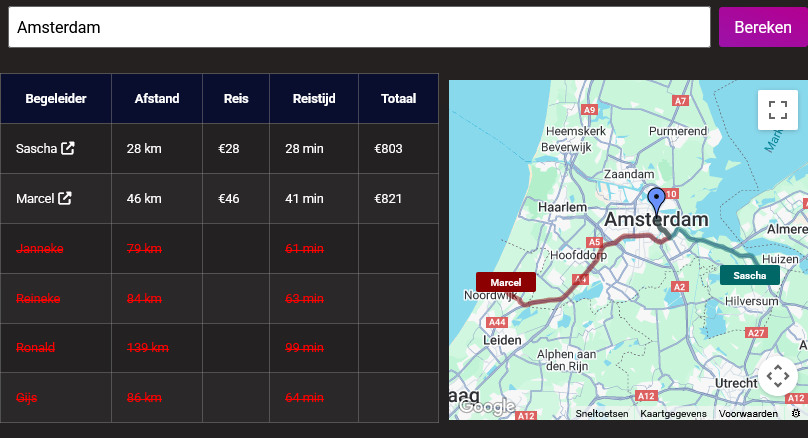
We offer several trip sitters in Amsterdam. If you hire a trip sitter through Triptherapie, you'll also receive the full preparation and integration options we offer as standard. The trip sit day lasts six hours and costs between €750 and €950, depending on the guide's experience and the chosen location. You can use the calculator below to quickly calculate the total cost. I've calculated the cost for Amsterdam city center, which you can see in the image.
If you don't live in the city center, the session might be less expensive and there are more trip sitters available to choose from. Use the tool yourself if you want to know exactly what it costs and which trip sitter will come to your home.
On-site price calculation session
Easily calculate the price here for a private psychedelic session for one to three participants at your own location or at one of ours. Sessions at Triptherapie locations always include one overnight stay plus food and drinks.
White text: The supervisor works at your location.
Orange textThe supervisor lives just outside your work area, but it is often possible to arrange a meeting.
Red text: You live too far away. Consider renting accommodation closer, a different supervisor, or participating in a group ceremony at one of our locations.
Enter your desired location:
Explanation of all options within this selection tool
This tool is designed to provide quick insight into the various ways a session can be scheduled via Triptherapie. The tool combines three things in one overview. You can choose the number of people, enter a starting location to have distances and travel times calculated, and switch between a map view for sessions at your own location or sessions at a Triptherapie location. As a result, you get not only a price indication but also an immediate, practical picture of which instructors or locations make the most sense.
The structure is as follows. On the left, you see the selection for the number of people, and below that, the two tables. The first table lists the facilitators for sessions at your own location. The second table lists the fixed Triptherapie locations. On the right, you see the map. With the map view, you choose whether you want to see the facilitators or the locations on the map. The tables remain visible so that you can always compare both types of options side by side.
Enter and calculate starting location
At the top, enter a city or address, for example Amsterdam. Then press the Calculate button. The tool uses that input to display two types of information.
For on-site supervisors, distance, travel time, travel expenses, and the total amount are taken into account. As a result, you see not only who is available or logical in terms of work area, but also what that means financially.
For the Triptherapie locations, the distance and travel time from your entered location to the chosen fixed location are taken into account. No additional travel cost calculation for the supervisor is added to this, as it concerns a session at a fixed Triptherapie location.
If you do not enter a starting location, the tool still displays all guides and all locations with their base prices for the selected number of people. As soon as you enter a location, the calculations are added.
Number of people
The Number of people option is located above the tables in the left column. This determines the number of people for whom the price is calculated. The tool calculates with three choices.
The basic price applies for 1 person.
For 2 people, 500 euros is added to the base price.
For 3 people, a total of 1,000 euros is added to the base price.
This means that the tool automatically adjusts when you switch between one, two, or three people. Both the facilitator table and the location table are then recalculated. This way, you immediately see the difference between an individual session, a duo session, or a session for three people with one facilitator.
Session at own accommodation
When looking at the counselors, the sessions take place at the client's location. This could be, for example, at home, in a hotel, in an Airbnb, or in another suitable private setting. In the table, you can see the place of residence for each counselor, or, after calculation, the distance, travel expenses, travel time, and the total amount.
The tool also takes practical limitations into account here. Some escorts can be deployed more quickly within a larger area, while for others, the maximum travel time is more limited. As a result, you sometimes see escorts in normal text, sometimes in orange, and sometimes crossed out in red. This helps to distinguish between a good fit, just barely possible, or less practically suitable.
This table is particularly useful for people who prefer to work in their own familiar environment, or who want to investigate which support worker best suits their location, both financially and practically.
Session at a Triptherapie location
The second table shows the fixed locations of Triptherapie. These are locations you travel to, rather than a guide coming to you. In this overview, you can see the town and, after calculation, the distance and travel time from your starting location. The total amount changes with the number of people.
This option is useful when you prefer to use a fixed setting that is already suitable for the session. In that case, you compare facilitators not so much based on travel time, but primarily on the different locations and their total price.
Map view
The map is on the right. Above the map, you use the map view to choose what you want to see on the map.
If you select Own accommodation, the map shows the guides. You will then see approximately where the various guides are located. If you have entered a starting location and pressed Calculate, routes can also be displayed.
If you choose the Triptherapie location, the map displays the fixed locations. This allows you to visually see which location is geographically most convenient in relation to your starting point.
The map view changes only the map. The tables on the left both remain visible, so you do not have to switch between screens while comparing.
Explanation of the supervisor options
Marcel
More information about Marcel
Reviews about Marcel
Book with Marcel at your own location
Janneke
More information about Janneke
Reviews of Janneke
Book with Janneke at your own location
Gijs
More information about Gijs
Reviews about Gijs
Reserve with Gijs at your own location
Sascha
More information about Sascha
Reviews about Sascha
Reserve with Sascha at your own location
Reineke
More information about Reineke
Reviews of Reineke
Agenda and reservations at Reineke
Ronald
Learn more about Ronald
Reviews about Ronald
Book with Ronald at your own location
Explanation of the fixed locations
De Bedding in Den Bosch
More information about De Bedding in Den Bosch
Book for De Bedding via Gijs
Sancta Psychedelica in Noordwijk
More information about Sancta Psychedelica in Noordwijk
Reservations at Sancta Psychedelica
Psychedelic Loft in Schiedam
More information about the Psychedelic Loft in Schiedam
Booking at the Psychedelic Loft
Complete contact or intake form
Would you like to register for a truffle therapy at TriptherapieComplete the intake form now, free of charge. Have any questions? Check out our FAQ section or contact us.
Question and Answer
Looking for a different question and answer? You can also use the search function on our site, consult the frequently asked questions section, or ask our chatbot, Trippy.
Final questions of the Q&A
How do you book a psilocybin (truffle) ceremony?
What is the best way to book a psilocybin truffle ceremony?
What is the cheapest psychedelic session or retreat?
What is the cheapest option for a psychedelic session?
Psychedelic session for clients from abroad
How do I book psychedelic therapy in the Netherlands if I'm traveling from abroad? What are the options?
Psychedelic therapists
Which of the therapists at Triptherapie are trained as psychologists and the like?